
Download AutoGPT JS – Free Autonomous AI Goal‑Achievement Tool for All Platforms
Overview
AutoGPT JS is a cutting‑edge, web‑based AI assistant created by the open‑source community behind the autogptjs project. Unlike traditional chatbots that wait for you to ask the next question, AutoGPT JS takes a single, high‑level goal—such as “produce a 20‑page market research report on renewable energy in Europe”—and autonomously breaks it down into concrete, executable tasks. The engine then runs those tasks in the background, gathers results, and iteratively refines its approach until the objective is met.
Because the entire application lives in the browser, there is no need to download installers, manage license keys, or allocate dedicated hardware resources. Users simply open a modern browser, type a goal, and let the AI handle the heavy lifting. This “self‑driving” workflow is especially valuable for freelancers who need rapid research, product managers looking for quick prototyping, and developers who want to embed autonomous reasoning into their own tools.
AutoGPT JS also benefits from continuous community contributions on GitHub, ensuring that new features, security patches, and performance improvements are delivered without any user intervention. In short, AutoGPT JS transforms vague ambitions into actionable plans, learns from each execution, and provides a secure, free, and always‑up‑to‑date AI experience across every major operating system.
Key Features
- Autonomous Goal Decomposition: Converts high‑level objectives into detailed, step‑by‑step tasks without manual prompting.
- Real‑Time Execution Engine: Executes generated tasks in the browser, handling API calls, web‑scraping, data parsing, and more.
- Continuous Learning Loop: Analyzes outcomes, updates internal heuristics, and improves future task suggestions.
- Zero‑Installation Access: Runs on any modern browser (Chrome, Edge, Firefox, Safari) with no additional plugins.
- Open‑Source Transparency: Full source code on GitHub enables audits, custom extensions, and community‑driven enhancements.
- Cross‑Platform Compatibility: Works on Windows, macOS, Linux, Android, and iOS through standard web browsers.
- Secure Data Handling: Processes data client‑side whenever possible; sensitive inputs never leave the device unless explicitly allowed.
- Custom Prompt Templates: Adjust tone, depth, and domain focus using simple JSON configuration files.
- Automatic Version Updates: The web interface always serves the latest stable release without manual patches.
- Extensible Plugin Architecture: Add third‑party modules for specialized tasks such as SEO analysis, financial modeling, or code generation.
Installation & Usage Instructions
Getting started with AutoGPT JS is essentially a one‑click experience because the tool lives entirely in the cloud. Follow the steps below to launch the application, define a goal, and retrieve results—all within a few minutes.
- Open the Official Portal: Navigate to https://autogptjs.com using any up‑to‑date browser. The site automatically detects your device type and serves an optimized layout for desktop, tablet, or mobile.
- Create an Account (Optional but Recommended): While anonymous usage is supported, registering provides benefits such as goal history, result export, and access to premium plugins. Registration requires only an email address and password; no credit card information is collected.
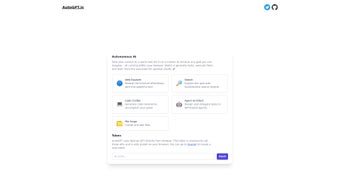
- Enter Your Goal: In the central input box, type a concise yet specific objective. For example: “Generate a 10‑page competitive analysis for AI‑driven fintech startups in North America.” Click the Start button to initiate the autonomous workflow.
- Monitor the Live Task Queue: AutoGPT JS displays each generated sub‑task, its current status (queued, running, completed), and an estimated time to finish. You can pause, reorder, or cancel individual steps if you need to intervene.
- Review and Export Results: Upon completion, a summary pane presents the final deliverable, detailed logs, and suggested next actions. Export options include PDF, CSV, or direct sync with cloud storage services such as Google Drive, Dropbox, and OneDrive.
- Iterate for Perfection: If the output requires refinement, edit the original goal or add constraints (e.g., “use only publicly available data”). Re‑run the process; the system incorporates feedback from the previous run, reducing the number of iterations needed over time.
Best‑Practice Tips: Keep goals narrowly scoped, provide relevant context (target audience, data sources, preferred format), and enable any required API keys in the Settings panel. Detailed prompts minimize guesswork, leading to faster execution and higher accuracy.
Compatibility: AutoGPT JS runs on any device that supports JavaScript ES2022 and Web Workers. Officially supported platforms include Windows 10/11, macOS Ventura or later, most Linux distributions, Android 9 +, and iOS 14 +. No additional extensions or runtime environments are necessary.
Pros & Cons
Pros
- Completely free core functionality; optional premium plugins are clearly marked.
- No installation required—runs directly in the browser, eliminating setup time.
- Autonomous task generation saves hours of manual planning and execution.
- Open‑source code encourages transparency, security audits, and community enhancements.
- Cross‑platform support ensures access from desktops, tablets, and smartphones.
- Client‑side processing protects sensitive information whenever possible.
- Continuous learning improves efficiency and accuracy with each session.
- Extensible plugin system allows users to add domain‑specific capabilities.
- Automatic updates keep the application current without user intervention.
- Rich export options (PDF, CSV, cloud sync) streamline downstream workflows.
Cons
- Performance is tied to internet speed and browser capabilities; low‑bandwidth connections may experience delays.
- Complex, multi‑step goals sometimes need several iterations to achieve optimal results.
- Advanced customizations (e.g., building new plugins) require basic JavaScript/Node.js knowledge.
- Limited offline functionality—core engine requires an active online session.
- No native desktop client for power users who prefer a standalone application.
- Some third‑party APIs used in plugins may incur additional costs outside the platform.
Frequently Asked Questions
Is AutoGPT JS truly free, or are there hidden fees?
The core platform is completely free. You can define goals, run tasks, and export results without any charge. Optional premium plugins or external API integrations may have their own pricing, but these are clearly indicated and are not required for basic usage.
Can AutoGPT JS be used on a corporate network with strict firewalls?
Yes. The application communicates exclusively over HTTPS (port 443). As long as outbound HTTPS traffic to autogptjs.com and any required third‑party APIs is permitted, the tool will function. You can also disable external API calls in the Settings panel if your organization restricts them.
How does AutoGPT JS protect my data privacy?
All user‑entered data is processed client‑side whenever possible. When the engine needs to call an external service (e.g., web‑scraping), only the minimal payload required for that task is transmitted, and responses are discarded after use. Because the codebase is open source, anyone can audit it for potential vulnerabilities.
Do I need programming skills to customize AutoGPT JS?
Basic JSON editing is sufficient to tweak prompt templates or enable/disable built‑in plugins. For deeper customizations—such as creating new modules—you’ll need familiarity with JavaScript and Node.js, but everyday users can get full value without writing code.
Which browsers are officially supported?
AutoGPT JS has been tested on Chrome 106 +, Microsoft Edge 106 +, Firefox 102 +, and Safari 15 +. Older browsers may experience reduced performance or incompatibilities, especially with the Web Workers used for background task execution.
Can I export my results to other tools?
Yes. AutoGPT JS provides built‑in export options for PDF, CSV, and direct integration with Google Drive, Dropbox, and OneDrive. Exported files can be imported into project‑management, data‑analysis, or reporting tools of your choice.
Conclusion & Call to Action
AutoGPT JS delivers a powerful, free, and truly autonomous AI experience that works directly in your browser. By turning a single high‑level goal into a series of executable tasks, it eliminates the tedious manual planning that often stalls productivity. The platform’s open‑source nature, cross‑platform compatibility, and continuous learning loop make it a compelling choice for freelancers, small businesses, and developers alike. While a stable internet connection and occasional iteration are required for very complex projects, the time saved and the ability to automate repetitive research or data‑processing tasks are undeniable. If you’re ready to boost efficiency, reduce manual effort, and let an intelligent system handle the grunt work, download AutoGPT JS today and start turning your ambitions into actionable results.



.png)



